Desktop Application Development Services
Your operations team runs on a desktop application last updated when Windows 7 was current. It works, mostly, but onboarding a new hire takes three weeks because nothing is intuitive and the documentation is a Word file from 2016 that references features that no longer exist.
We build modern desktop software that runs everywhere, learns quickly, and doesn't hold your team hostage.
The problem
Sound familiar?
The legacy hostage
Your business depends on software so old and embedded that everyone is afraid to replace it. But maintaining it costs more each year as the technology stack becomes a museum exhibit.
The platform prison
Windows only. Your remote team uses Macs. Your field team uses whatever they can find. The workaround? A Citrix session that adds 3 seconds of latency to every click.
The update nightmare
Pushing an update means emailing an installer to 200 people and hoping they run it. Half of your users are on version 2.3. The other half are on 2.7. Bug reports are chaos.
The integration gap
Your desktop app lives in its own world. It can't talk to your CRM, your analytics, or your cloud storage. Data gets exported to CSV and re-imported by hand.
Our approach
Here's how we fix this.
We build modern desktop software that runs everywhere, learns quickly, and doesn't hold your team hostage.
How we deliver
Our Desktop Development Process
Workflow shadowing
Week 1-2We sit with your team and watch how they actually use the current system. Not how the manual says to use it, how humans actually use it, workarounds and all.
Platform & tech selection
Week 2-3Electron, Tauri, .NET MAUI, or native, chosen based on your performance needs, offline requirements, and integration landscape. No religious wars.
Core workflows first
Week 3-8Build the 3-5 workflows that account for 80% of daily usage. Ship a beta to your power users within weeks, not months.
Auto-update & distribution
Week 8-10Built-in update mechanism so every user is always on the latest version. No more emailed installers. No more version chaos.
Migration & parallel running
Week 10-14Run old and new systems side-by-side. Migrate data. Validate with real users. Cut over when confidence is 100%, not when the deadline demands it.
What you get
Desktop Development Features & Deliverables
Cross-platform desktop application
Windows, Mac, Linux, one codebase, native feel
Auto-update infrastructure
All users on the latest version, always
Offline-first architecture
Works without internet, syncs when connected
Cloud integration layer
Connects to your existing tools and data
Installer & deployment pipeline
Code-signed builds, one-click install for end users
Data migration toolkit
Zero data loss from legacy system to new
Proof, not promises
We've done this before.
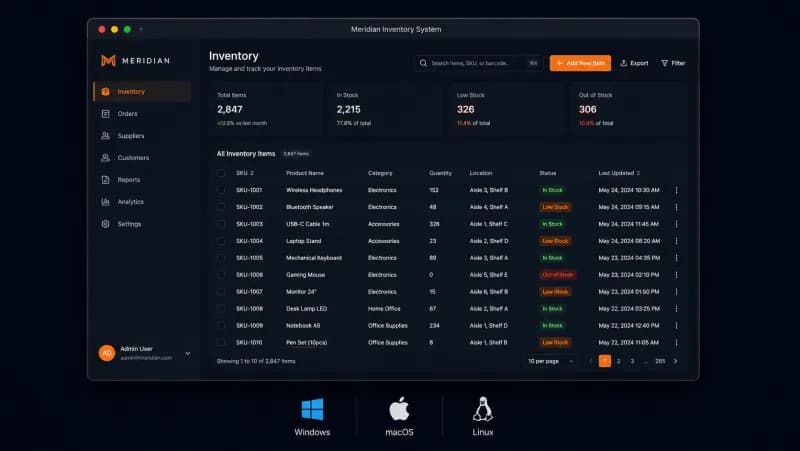
Meridian Precision Manufacturing
The situation
Meridian ran their entire inventory, work-order tracking, and quality control workflow on a Visual Basic 6 application built in 2003, running on a Windows Server 2008 box in their Akron, Ohio plant. The app had no network capability, floor managers physically walked to the server terminal to enter data. When their sole developer who maintained the system retired, they discovered the source code for two critical modules was lost entirely (only compiled DLLs remained). Simultaneously, their largest automotive customer began requiring digital traceability records, which the VB6 system couldn't produce.
Technical challenge
The existing system managed 34,000 SKUs across 3 warehouses with real-time stock levels, machine assignment scheduling, and quality inspection workflows that interfaced with Mitutoyo CMM measurement devices via RS-232 serial connections. The new system needed to run on plant-floor Windows terminals (some still on Windows 10 LTSC), integrate with their existing Epicor ERP via REST API, support barcode scanners, generate PDF traceability reports per automotive IATF 16949 standards, and work offline when network connectivity dropped (common in their fabrication building). All 42 floor operators needed retraining, so UI familiarity was critical.
What we did
Built a cross-platform desktop application using Electron with React frontend and SQLite for local-first offline capability, syncing to a central PostgreSQL database via a conflict-resolution queue when connectivity restored
Reverse-engineered the lost VB6 modules by analyzing the compiled DLLs with IDA Free and reconstructing the work-order scheduling logic through interviews with senior floor managers who'd used the system for 15+ years
Implemented barcode scanner integration via HID protocol and built a custom serial communication layer for Mitutoyo CMM devices using Node.js serialport library, preserving existing measurement hardware investment
Designed the UI to mirror the original VB6 screen layouts where possible, reducing training friction, while adding contextual quality dashboards that surfaced reject rates and SPC charts inline
Built automated IATF 16949 traceability report generation as PDFs with full material genealogy, measurement data, and operator sign-off chains exportable per customer purchase order
Results
Data Entry Time Per Work Order
Inventory Accuracy
Traceability Report Generation
Operator Training Time
Stockout Incidents Per Quarter
Quality Escape Rate
Technologies
 React
React TypeScriptSQLite
 PostgreSQL
 Node.jsserialport
 PrismaEpicor REST APIPDFKitZustand
What stood out most about working with CodeMiners was their strong technical expertise. The platform enabled users to easily book services and the team maintained clear communication throughout.

Desktop Development FAQ
Common questions about our desktop development services
Book a Free 30-Minute Call with Us
No sales pitch. Discuss your project, get honest advice, and a fixed-price quote within 4 hours.
Ready to start?
Your team deserves tools that help them work, not tools they have to fight. Let's build that.