Mobile App Development Services
Your app is live. Three stars. The reviews say 'crashes on Android 14' and 'why does this need access to my contacts?' Meanwhile, your developer says it works fine on his phone. His phone. One phone. In a world of twelve thousand device configurations.
We build mobile apps that survive the real world, not just the demo room.
The problem
Sound familiar?
The eternal beta
Your app has been 'almost ready' for four months. Every fix introduces two new bugs. The backlog grows faster than the team ships.
The platform gap
iOS works beautifully. Android is a disaster. Your Android users, 48% of your base, are treated as second-class citizens because the team only really knows Swift.
The performance spiral
Load time creeps up with every release. Users complain but you can't pinpoint why. The app is doing too much, too slowly, on too many threads.
The app store wall
Rejected again. Vague policy reason. Your team scrambles to interpret Apple's cryptic guidelines while your launch window closes.
Our approach
Here's how we fix this.
We build mobile apps that survive the real world, not just the demo room.
How we deliver
Our Mobile Development Process
Architecture & platform strategy
Week 1-2We assess your requirements and choose the right approach, native, cross-platform, or hybrid, based on your users, your timeline, and your budget. No dogma, just engineering trade-offs.
Design & prototype
Week 2-4Interactive prototypes on real devices, not just Figma screens. You tap through the experience before a single line of production code is written.
Build in sprints
Week 4-12Two-week sprints with testable builds deployed to your device after each one. You never go more than 14 days without seeing progress you can hold in your hand.
QA across the matrix
Week 10-13We test on 30+ device configurations, not one developer's phone. Performance profiling, accessibility checks, and edge-case coverage before any user sees it.
Launch & iterate
Week 13-14App store submission handled. Review guidelines pre-checked. Post-launch analytics configured so you know exactly how users behave from day one.
What you get
Mobile Development Features & Deliverables
Production apps on iOS & Android
One codebase or native, optimized for your specific needs
CI/CD pipeline for mobile
Push to TestFlight/Play Console with every merge
Performance baseline & monitoring
Know before users complain
App store optimization
Screenshots, descriptions, and keywords that convert
Analytics integration
User flows, crash reports, and engagement metrics from day one
Push notification infrastructure
Re-engage users without being annoying
Proof, not promises
We've done this before.
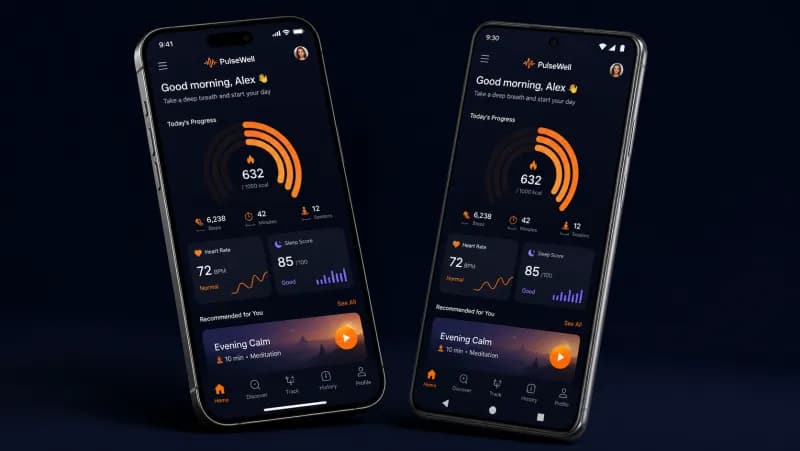
PulseWell
The situation
PulseWell had a React Native app serving 120K users for guided meditation, sleep tracking, and biometric-based stress scoring. Their Android experience was unusable, 6-second cold starts, janky scroll performance in their session library, and Bluetooth connectivity drops with wearable devices. They'd hit a 2.8-star Play Store rating and were hemorrhaging 400+ daily uninstalls. Their in-house team of two mobile devs had tried performance patches for four months with no meaningful improvement. The CEO told us their Series B depended on getting Android retention numbers in line with iOS within one quarter.
Technical challenge
The existing codebase had 73 native modules, most poorly bridged. The Bluetooth Low Energy (BLE) layer for wearable sync was written in raw Java with no error recovery, it silently failed on Android 12+ due to new runtime permissions. The app bundled 340MB of uncompressed audio assets with no lazy loading. Navigation used a deprecated library (react-navigation v4) causing memory leaks on Android when users moved between deep stack screens. Timeline: 14 weeks to full Play Store relaunch. Constraint: must maintain feature parity with existing iOS app and preserve all user data during migration.
What we did
Rebuilt the BLE communication layer using react-native-ble-plx with exponential backoff reconnection, proper Android 12/13 permission flows, and a connection state machine that handles 47 distinct edge cases across Samsung, Pixel, and OnePlus devices
Migrated navigation to React Navigation v6 with native stack, reducing screen transition overhead by 80% and eliminating the memory leak that was causing OOM crashes after 15+ minutes of use
Implemented audio asset streaming with background pre-caching using a custom native module wrapping ExoPlayer on Android, reducing initial bundle size from 340MB to 42MB
Rewrote the session library list with FlashList, virtualized rendering, and skeleton loading, achieving consistent 60fps scroll on devices as old as Samsung Galaxy A12
Set up Detox end-to-end testing across 12 device configurations in a CI pipeline using GitHub Actions with Firebase Test Lab integration for real-device testing on every PR
Results
Play Store Rating
Android Cold Start Time
Daily Uninstalls (Android)
BLE Connection Success Rate
Day-30 Retention (Android)
App Bundle Size
Technologies
 React Native
 TypeScript
 ExoPlayer
 Firebase Test Lab
 GitHub Actions
 FlashListreact-native-ble-plx
 Detox
Detox Fastlane
 Sentry
Their engineering execution stands out. We onboarded 21,500 artists and reached 15,000 monthly active users. The team manages the project transparently, delivers on time, and communicates proactively.
Tech stack
Built on what works.
Mobile




Database
Mobile Development Pricing
Transparent, fixed-price packages. No hidden fees. 65% below comparable US agency rates.
MVP / Simple App
6–8 weeks delivery
Validate your idea with a production-ready app on both platforms.
- ✓iOS and Android (cross-platform)
- ✓Up to 8 core screens
- ✓User authentication
- ✓Push notifications
- ✓Basic analytics integration
- ✓App Store + Play Store submission
- ✓30 days post-launch support
Standard App
8–12 weeks delivery
Feature-rich apps with custom backend, integrations, and polished UX.
- ✓iOS and Android (native or cross-platform)
- ✓Custom backend API
- ✓Payment integration
- ✓Real-time features (chat, sync)
- ✓Offline mode support
- ✓CI/CD for mobile builds
- ✓QA on 30+ device configs
- ✓60 days post-launch support
Complex / Enterprise App
12–20 weeks delivery
Enterprise-grade apps with complex integrations, AI features, or IoT.
- ✓Native iOS + Android (if needed)
- ✓AI/ML integration
- ✓IoT device connectivity
- ✓Enterprise SSO and security
- ✓Custom animations and UX
- ✓Multi-language support
- ✓Performance optimization
- ✓90 days post-launch support
- ✓Dedicated project manager
All prices are fixed-price estimates. Final quote provided within 4 hours of consultation. No hourly billing surprises.
Traditional Agency vs. CodeMiners
See why 200+ companies chose CodeMiners over traditional alternatives
| Feature | Traditional US Agency | CodeMiners |
|---|---|---|
| Simple App (MVP) | $15,000–$50,000 | $800–$3,000 |
| Standard App | $50,000–$150,000 | $3,000–$8,000 |
| Complex App | $150,000–$500,000+ | $8,000–$25,000+ |
| Time to App Store | 4–8 months | 6–14 weeks |
| Platforms Covered | Usually one at a time | iOS + Android from day one |
| Device Testing | 5–10 devices | 30+ device configurations |
| App Store Submission | Extra charge ($2,000+) | Included in all packages |
| Post-Launch Support | $200+/hr retainer | Included (30–90 days) |
| Sprint Visibility | Monthly demos | Testable builds every 2 weeks |
| Pricing Model | Hourly (cost overruns common) | Fixed price (no surprises) |
Mobile Development FAQ
Common questions about our mobile development services
Mobile Development Resources
Mobile Development Guides & Insights
In-depth guides to help you plan, budget, and execute your mobile development project.
How to Choose a Mobile App Development Company
10 evaluation criteria, red flags, and cost comparison by company type.
Read guideMobile App Development Process: Idea to App Store
7 phases of mobile app development with timelines and deliverables.
Read guideMobile App Development Cost in 2026: Complete Breakdown
Detailed cost analysis for iOS, Android, and cross-platform apps.
Read guideFlutter App Development Cost: What to Expect
Flutter development pricing, timelines, and cost-saving strategies.
Read guideiOS App Development Cost Guide
Everything you need to know about building an iOS app.
Read guideAndroid App Development Cost Guide
Android development costs, from MVP to enterprise.
Read guideReact Native App Development Cost
React Native pricing and cross-platform cost comparison.
Read guideHow Long Does It Take to Build an App?
Realistic timelines for mobile app development projects.
Read guideiOS vs Android: Which to Build First?
Platform decision framework for startups and businesses.
Read guideReact Native vs Flutter: Complete Comparison
Head-to-head comparison of the top cross-platform frameworks.
Read guideMobile App Security Best Practices
Security guidelines for iOS and Android applications.
Read guideMobile App Monetization Guide
Revenue models and monetization strategies for mobile apps.
Read guideB2C Mobile App Growth Strategy
User acquisition and retention strategies for consumer apps.
Read guideHealthcare App Development (HIPAA)
Building HIPAA-compliant healthcare and medical apps.
Read guideFintech App Development Guide
Financial app development with security and compliance.
Read guideFood Delivery App Development
Building on-demand food delivery platforms.
Read guideMobile-First Design Strategy
Designing for mobile users first, then scaling up.
Read guideAI-Powered App Development
Integrating AI and ML into mobile applications.
Read guideEdTech App Development Guide
Building educational apps and learning platforms.
Read guideWearable & IoT App Development
Connected device and wearable app development.
Read guidePropTech Real Estate App Development
Real estate technology and property app development.
Read guideBook a Free 30-Minute Call with Us
No sales pitch. Discuss your project, get honest advice, and a fixed-price quote within 4 hours.
Ready to start?
Your app should make users smile, not sigh. Let's talk about what that looks like for your product.